




The landscape of global education is undergoing a fundamental shift as Microsoft Corporation officially unveils Microsoft Elevate for Educators, a comprehensive initiative designed to integrate generative artificial intelligence into the core of the teaching and learning experience. Announced ahead of the Bett UK 2026 conference, this program represents a strategic pivot for the technology giant, moving beyond general-purpose AI to provide specialized, education-centric tools and professional development. By combining secure, on-device intelligence with a massive skilling commitment, Microsoft aims to address the growing "AI gap" in schools, where the rapid adoption of technology has often outpaced the training provided to those at the front of the classroom.
The centerpiece of this announcement is a multifaceted ecosystem comprising new software applications, hardware-optimized experiences, and a global skilling mandate. Microsoft Elevate for Educators is positioned as a subset of the company’s broader "Microsoft Elevate" commitment, which seeks to provide 20 million people with in-demand AI credentials over the next two years. For the education sector, this translates to providing school leaders and teachers with access to one of the world’s largest peer networks, free professional development resources, and specialized AI tools designed to reclaim time currently lost to administrative and preparatory tasks.
A Strategic Timeline of AI Integration in Education
The launch of Microsoft Elevate for Educators marks a significant milestone in a timeline that began with the initial integration of large language models into the Microsoft 365 suite in early 2023. Over the past three years, the company has transitioned from experimental "Copilot" previews to a structured, academic-specific framework.
In 2024, Microsoft initiated pilot programs with select school districts globally to test the efficacy of AI in lesson planning and student engagement. By mid-2025, the focus shifted toward "Responsible AI," ensuring that data privacy and pedagogical integrity were maintained. The current 2026 rollout represents the "Scaling Phase," where tools like the "Teach" app and "Study and Learn Agent" are being moved from limited testing into broad availability for Microsoft 365 Education customers. This chronology highlights a shift from viewing AI as a supplementary novelty to treating it as essential infrastructure for the modern classroom.

The ‘Teach’ App: Streamlining the Instructional Workflow
One of the most immediate practical applications of the new suite is "Teach," a specialized AI assistant integrated directly into the Microsoft 365 Copilot app. This tool is designed to solve a perennial problem in education: the excessive time educators spend on non-instructional tasks. According to recent industry data, teachers spend an average of 10 to 15 hours per week on lesson planning, grading, and administrative reporting.
The Teach app aims to reduce this burden by providing customizable features for creating lesson plans, generating quizzes, and developing rubrics. A key innovation within the app is its ability to adapt instructional materials to different reading levels instantly. By using simple prompts, an educator can take a single scientific article and generate three versions tailored to students with varying linguistic or cognitive needs, ensuring that every learner can participate in the same core curriculum. This capability is offered at no additional cost to existing education customers, signaling Microsoft’s intent to lower the barrier to entry for high-level AI utility.
Hardware-Driven Innovation: Copilot+ PCs and the Learning Zone
The announcement also underscores a deeper synergy between Microsoft’s software ecosystem and its hardware division. The new "Microsoft Learning Zone" app is specifically optimized for Copilot+ PCs, which utilize Neural Processing Units (NPUs) to handle AI tasks locally on the device rather than relying solely on the cloud. This "on-device intelligence" offers faster response times and enhanced privacy, as sensitive student data can be processed without leaving the machine.
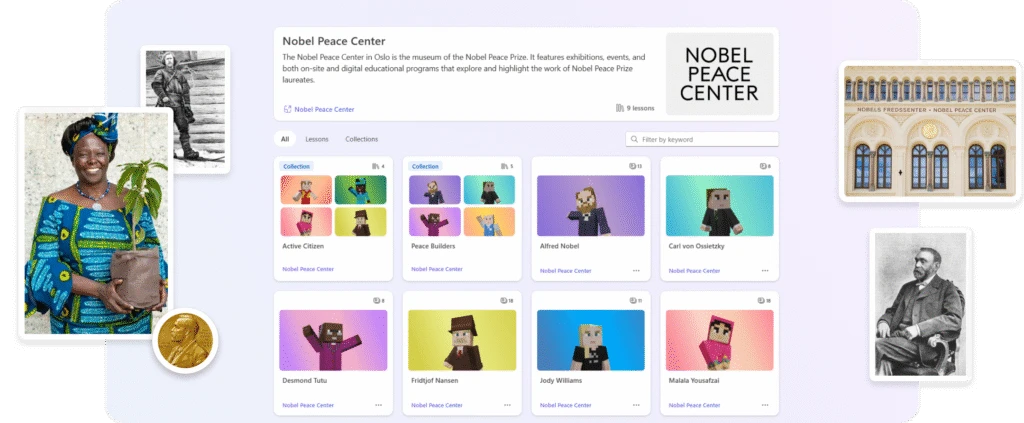
Microsoft Learning Zone has already earned the International Society for Technology in Education (ISTE) Seal of Alignment, a rigorous certification that evaluates products based on learning design, usability, and research-backed teaching practices. The app features high-quality content from a prestigious roster of partners, including:
- NASA and OpenStax: Providing rigorous STEM content and open-access textbooks.
- The Nobel Peace Center: A new collection of lessons exploring peace and human rights through the stories of laureates like Malala Yousafzai.
- Minecraft Education: Interactive companion activities that allow students to explore historical and scientific concepts within a gamified environment.
- World Wildlife Fund (WWF) and PBS NewsHour: Bringing real-world environmental data and journalistic literacy into the classroom.
The app currently supports English and Spanish, with plans to expand to Portuguese, French, and German later in 2026. This localized approach is critical for Microsoft’s goal of global AI workforce readiness.
Empowering Students: The Study and Learn Agent and Higher Education Incentives
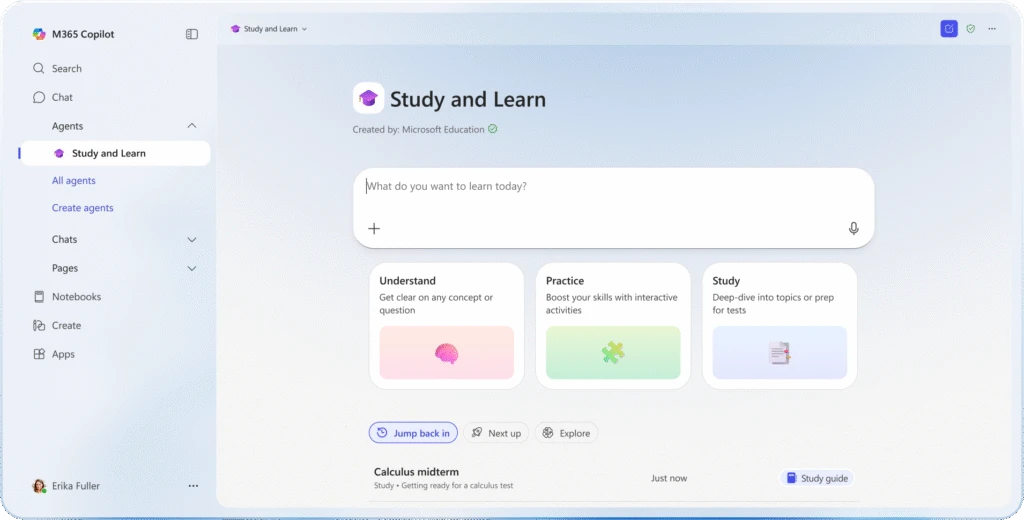
While much of the focus is on supporting teachers, Microsoft is also introducing tools aimed directly at student autonomy. The "Study and Learn Agent" is an AI-powered companion designed for students aged 13 and older. Built on established learning science principles, the agent does not simply provide answers; instead, it acts as a tutor that guides students through concepts using adaptive exercises, flashcards, and matching games.
For the higher education sector, Microsoft is addressing the "career readiness gap" by offering eligible students 12 months of free access to Microsoft 365 Premium and LinkedIn Premium Career. This initiative is designed to assist students in the transition from the classroom to the professional world, providing them with advanced tools for research, presentation design, and job searching. By bundling these services, Microsoft is positioning its ecosystem as a lifelong partner in a student’s professional trajectory.
Security and Governance: The IDC White Paper and Security Toolkit
The rapid adoption of AI has raised significant concerns regarding cybersecurity and data ethics in schools. To address these challenges, Microsoft has introduced the Microsoft Education Security Toolkit. This resource provides a roadmap for institutional leaders to strengthen their cybersecurity posture while implementing AI.
Supporting this effort is a new IDC White Paper, "A Blueprint for AI-Ready Schools: Strategies from the Front Lines of K-12 Education." The report analyzes data from early adopters such as Brisbane Catholic Education in Australia and the Coquitlam School District in Canada. Key findings from the white paper suggest that successful AI integration requires a "top-down, bottom-up" approach, where district-level security protocols are matched with teacher-level professional development.
The IDC data indicates that institutions with a clear AI policy see a 30% higher rate of teacher satisfaction compared to those where AI use is unregulated or discouraged. This suggests that the primary hurdle to AI adoption is not the technology itself, but the lack of clear institutional guidance.
Global Reactions and Inferred Industry Impact
Industry analysts suggest that Microsoft’s aggressive push into education AI is a direct response to similar moves by Google and Apple, both of which have introduced AI features for their respective classroom platforms. However, Microsoft’s focus on professional credentials and deep integration with LinkedIn gives it a unique edge in the higher education and workforce development space.
Educational associations have generally reacted with cautious optimism. While the efficiency gains of tools like "Teach" are undeniable, some labor representatives have raised questions about the long-term impact on teacher autonomy and the potential for "algorithmic bias" in AI-generated rubrics. Microsoft has countered these concerns by emphasizing that its tools are designed to "amplify teacher expertise" rather than replace it, keeping the "human in the loop" for all final instructional decisions.
The broader implication of this rollout is the democratization of high-level educational technology. By providing these tools at no extra cost to M365 Education customers, Microsoft is attempting to prevent a "digital divide" where only wealthy private institutions can afford cutting-edge AI tutors and administrative assistants.
Conclusion: Shaping the Future of the AI-Ready Campus
As Microsoft prepares to showcase these innovations at Bett UK 2026, the message to the global education community is clear: AI is no longer a future possibility, but a present reality. Through the Microsoft Elevate for Educators program, the company is attempting to build the human capacity necessary to manage this technological shift.
The success of these initiatives will ultimately be measured not by the sophistication of the algorithms, but by the time reclaimed for educators to engage in meaningful human connection with their students. By automating the mundane and personalizing the complex, Microsoft is betting that the AI-powered classroom will be more responsive, more inclusive, and better equipped to prepare the next generation for an increasingly automated world. Educators and school leaders are encouraged to explore the new Security and AI Toolkits as they begin the transition toward becoming truly AI-ready institutions.