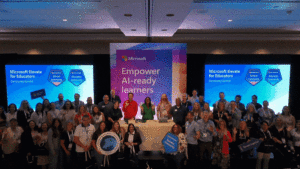



Microsoft has announced the general availability of the Study and Learn agent within Microsoft 365 Copilot, marking a significant pivot in how generative artificial intelligence is integrated into academic environments. Designed specifically for students aged 13 and older, the new tool is now available to all education customers at no additional cost. Unlike general-purpose AI models that often prioritize immediate answers, the Study and Learn agent is built on the core principle that the learner must remain the primary driver of the cognitive process. This release comes at a critical juncture for educational institutions, many of which have struggled to balance the undeniable utility of AI with the need to maintain academic rigor and prevent the erosion of critical thinking skills.
The introduction of the Study and Learn agent addresses a growing tension in the education sector. Recent industry data suggests that while a majority of students are already utilizing AI tools to assist with their coursework, many of these tools are designed as productivity aids rather than pedagogical ones. This "shortcut" approach has led several school districts and universities to implement restrictive policies or outright bans on AI. Microsoft’s latest offering seeks to bridge this gap by reframing AI as a sophisticated coaching experience rather than an "answer bot," providing a structured environment where students are guided toward understanding through inquiry and interactive practice.
A Pedagogy-First Approach to Generative AI
The architectural foundation of the Study and Learn agent is rooted in established learning science. Microsoft developers collaborated with educational experts to ensure the AI interactions align with research-based instructional strategies. The experience is centered on four primary pillars: active engagement, retrieval practice, scaffolding, and metacognitive reflection. By adhering to these principles, the agent avoids the "passive review" trap, where students simply read through generated summaries without internalizing the material.
Active engagement is facilitated through a conversational interface that requires students to respond to questions and explain their reasoning. Instead of solving a calculus problem for a student, the agent might identify a specific step where the student is struggling and offer a hint or a conceptual explanation to help them overcome that specific hurdle. This method, known as scaffolding, ensures that the AI provides just enough support to move the student forward without removing the intellectual challenge.

Retrieval practice is another core component, utilized through the agent’s ability to generate on-the-spot assessments. For instance, a student studying the cell cycle in biology can prompt the agent to create a set of digital flashcards or a matching activity. By forcing the brain to recall information, the tool helps solidify long-term retention—a stark contrast to the fleeting "copy-paste" interactions common with standard AI chatbots.
Administrative Control and Security Guardrails
For IT administrators and school leaders, the deployment of AI for minors carries significant legal and ethical responsibilities. Microsoft has integrated the Study and Learn agent directly into the Microsoft 365 Education ecosystem, allowing for enterprise-grade data protection and administrative oversight. One of the most notable features for K-12 institutions is that Copilot Chat is turned off by default for students. Access must be explicitly granted by an IT administrator through the Microsoft Entra ID (formerly Azure AD) portal.
Once enabled, students access the Study and Learn agent through their school credentials, ensuring that all interactions remain within the institution’s managed environment. This setup provides several layers of protection:
- Data Privacy: Interactions within the Study and Learn agent are not used to train the underlying large language models (LLMs), protecting student intellectual property and privacy.
- Age-Appropriate Content: The agent includes built-in filters and guardrails designed to prevent the generation of inappropriate content and to maintain a focus on academic topics.
- Accessibility: By integrating the tool directly into the Copilot app on web and desktop, Microsoft eliminates the need for third-party logins or additional applications, reducing the attack surface for potential security breaches.
Chronology of Microsoft’s Educational AI Evolution
The release of the Study and Learn agent is the latest milestone in a multi-year effort by Microsoft to dominate the educational technology landscape through AI integration.
- Early 2023: Microsoft began the initial rollout of Copilot features across its productivity suite, initially focusing on corporate and enterprise users.
- Late 2023: The company introduced "Copilot for Microsoft 365" for higher education faculty and staff, recognizing the need for administrative efficiency.
- Early 2024: Microsoft expanded Copilot access to students in higher education, while simultaneously developing specialized "agents" to meet the unique needs of K-12 and university-level learning.
- Mid-2024: The "Teach" agent was introduced, designed to help educators with lesson planning, rubric creation, and content differentiation.
- Present: The "Study and Learn" agent is launched as the student-facing counterpart to the Teach agent, completing a dual-sided AI ecosystem for the classroom.
This timeline illustrates a shift from general-purpose AI to highly specialized, role-based agents. Microsoft’s strategy appears to be focused on creating a closed loop where the teacher uses AI to design high-quality instruction and the student uses AI to master that instruction, all within the same secure platform.

Feature Deep Dive: Transforming Chat into Active Learning
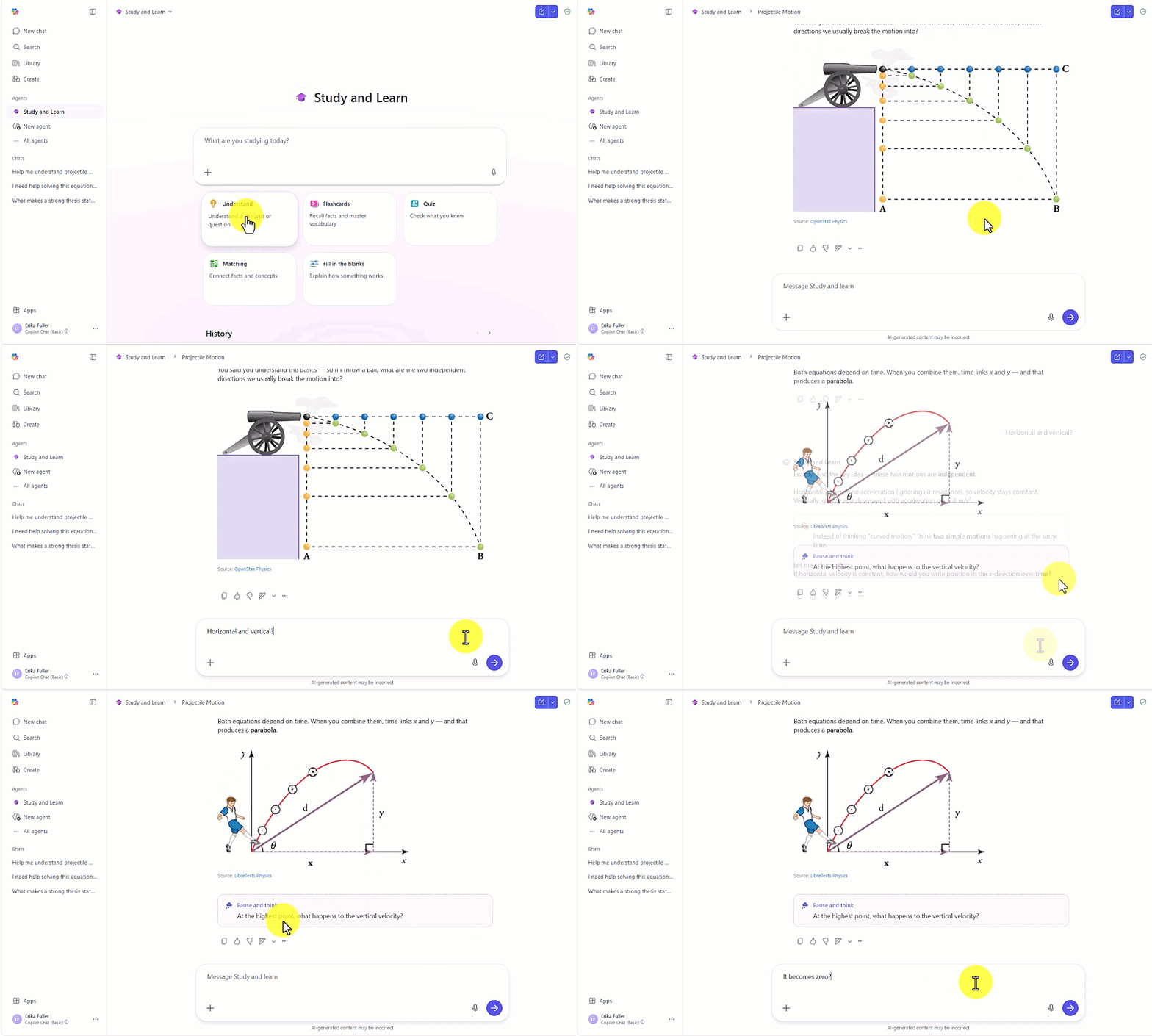
The Study and Learn agent distinguishes itself from the standard Copilot Chat through its interactive modules. Beyond simple text-based dialogue, the agent can generate visual aids and structured activities. For example, in a physics context, the agent can provide step-by-step coaching accompanied by diagrams to illustrate concepts like torque or electromagnetic induction.
In the realm of humanities, the agent acts as a Socratic tutor. If a student is drafting a history essay, they can engage the agent to pressure-test their thesis. Rather than writing the essay for them, the agent asks probing questions such as, "How does the economic context of the 1920s support your argument about the causes of the Great Depression?" This forces the student to refine their thinking and find evidence, simulating a 1:1 tutoring session.
The tool also supports "retention-focused study" through the automated creation of practice quizzes. These quizzes are not static; they adapt based on the student’s performance. If a student consistently misses questions related to a specific sub-topic, the agent will prioritize that area in subsequent questions, employing a technique similar to spaced repetition.
Institutional Responses and Market Implications
The reception from the educational community has been cautiously optimistic. Educational technology analysts suggest that by positioning the tool as a "learning-first" experience, Microsoft is effectively addressing the primary concern of educators: the loss of student agency.
"The challenge has never been the technology itself, but the intent behind its design," says one industry observer. "By building an agent that refuses to give the final answer, Microsoft is attempting to reclaim AI as a tool for empowerment rather than a tool for avoidance."
However, some critics argue that the efficacy of the Study and Learn agent will depend heavily on teacher training. While the tool is designed to support independent thinking, its success in a classroom setting requires educators to understand how to integrate these AI interactions into their broader curriculum. There are also ongoing concerns regarding the "digital divide," as institutions with robust Microsoft 365 deployments will have a distinct advantage over those using less integrated or more restrictive platforms.
From a market perspective, this move places significant pressure on competitors like Google and OpenAI. Google’s "Gemini" for Education has also been making inroads into schools, but Microsoft’s deep integration with the Office 365 suite—which is already the standard in many global education systems—gives it a formidable advantage. By offering the Study and Learn agent at no additional cost to existing license holders, Microsoft is incentivizing schools to stay within its ecosystem rather than seeking third-party AI tutoring subscriptions.
Future Outlook and Expansion
Currently, the Study and Learn agent is optimized for English (United States), but Microsoft has confirmed plans to expand language support in the coming months. This expansion is vital for global adoption and for supporting English Language Learners (ELL) within domestic markets.
As AI continues to evolve, the distinction between "answering" and "teaching" will likely become the primary battleground for educational software. Microsoft’s commitment to the principle that "the learner does the thinking" sets a high bar for the industry. The long-term impact of the Study and Learn agent will be measured not just by its adoption rates, but by its ability to demonstrably improve student outcomes and foster a generation of learners who use AI to enhance, rather than replace, their own intellectual capabilities.
For now, IT administrators are encouraged to review the configuration guides and video walkthroughs provided by Microsoft to begin the deployment process. As schools move into the next academic cycle, the presence of guided AI coaching is poised to become a standard feature of the modern digital classroom.