


The global educational landscape is currently navigating a pivotal technological shift as Microsoft prepares for the formal retirement of Windows 10 on October 14, 2025. This transition marks more than a routine software update; it represents a comprehensive re-engineering of the digital classroom to accommodate heightened security requirements, diverse accessibility needs, and the rapid integration of artificial intelligence (AI). For primary, secondary, and higher education institutions, the move to Windows 11 Education is being framed not merely as a technical necessity but as a strategic upgrade designed to future-proof learning environments against a backdrop of increasing cyber threats and evolving pedagogical demands.
As schools become more interconnected, the complexity of managing digital ecosystems has grown exponentially. Modern classrooms are no longer defined by physical boundaries but by their digital reach, encompassing multilingual student bodies and diverse learning requirements. This shift necessitates a platform that is inherently secure, high-performing, and capable of scaling across entire districts. Microsoft has positioned Windows 11 as the answer to these challenges, emphasizing a "secure by design" philosophy that addresses the vulnerabilities of an increasingly online educational sector.
The Technological Evolution of the Modern Classroom
The transition to Windows 11 occurs at a time when the education sector is facing unprecedented pressure to modernize. Over the last decade, the role of technology in schools has shifted from a supplementary resource to a fundamental infrastructure. This evolution has been accelerated by global events that normalized remote and hybrid learning models, creating a permanent demand for reliable, secure, and accessible operating systems.
The current educational environment is characterized by three primary drivers: the need for robust cybersecurity, the demand for equitable access to learning tools, and the integration of generative AI to assist both teachers and students. Windows 11 was engineered to address these pillars through hardware-level security and software-based innovation. By requiring the Trusted Platform Module (TPM) 2.0, Microsoft has established a baseline for hardware security that protects against sophisticated firmware attacks, a growing concern as schools become prime targets for ransomware and data breaches.

Chronology of the Transition: From Windows 10 to the AI Era
The roadmap toward Windows 11 Education began with the initial launch of the operating system in late 2021, but the timeline for educational institutions has been specifically influenced by the lifecycle of Windows 10. Launched in 2015, Windows 10 served as the backbone of school IT for a decade. However, the announcement of its End of Support (EOS) date has triggered a multi-year planning cycle for IT administrators.
In 2023, the momentum for migration increased as institutions began assessing hardware compatibility. By mid-2024, Microsoft introduced the Copilot+ PC category, signaling a shift toward hardware optimized specifically for AI workloads. The final phase of this chronology is the period between late 2024 and October 2025, during which schools must decide between upgrading existing fleets, purchasing new hardware, or enrolling in the Extended Security Update (ESU) program to bridge the gap.
Security Infrastructure and Administrative Efficiency
One of the most critical aspects of the Windows 11 upgrade is the enhancement of the security stack. Education is frequently cited by cybersecurity firms as one of the most targeted sectors due to the high volume of sensitive personal data and often underfunded IT departments. Windows 11 addresses this through Microsoft Defender, which provides real-time, automated updates to counter emerging digital risks.
The integration of Microsoft Intune further streamlines this process. For IT departments managing thousands of devices across multiple campuses, centralized management is a necessity rather than a luxury. Intune allows for the remote deployment of security policies, software updates, and troubleshooting, significantly reducing the manual labor required to maintain a consistent digital environment. This administrative efficiency translates to cost savings, as IT staff can focus on high-level strategic initiatives rather than routine maintenance.
Performance enhancements also play a vital role in the classroom experience. Windows 11 offers faster boot times and improved power management, ensuring that devices remain functional throughout the school day. Accessibility features, such as system-wide live captions and advanced voice typing, are built directly into the OS, supporting equity by ensuring that students with different learning needs can participate fully without requiring specialized third-party software.

Data Analysis: The Case Study of Ceibal in Uruguay
The practical benefits of the Windows 11 transition are evidenced by the experience of Ceibal, the government agency responsible for Uruguay’s public education technology. As the largest Microsoft education tenant in Latin America, Ceibal’s migration serves as a global benchmark for large-scale digital transformation.
In 2023, Ceibal adopted Windows 11 as its primary operating system, deploying it to over 240,000 students and teachers. The impact on their Learning Management System (LMS), CREA, was profound. Usage rates for the platform rose from 55% in 2019 to 86% by 2024. According to Mateo Pérez, Product Coordinator at Ceibal, the migration solved significant fragmentation issues. Previously, maintenance costs were inflated because different device models ran various versions of the OS. By standardizing on Windows 11, the agency achieved better hardware-software compatibility, reduced update costs, and enhanced overall system security.
AI-Powered Learning and the Copilot+ Ecosystem
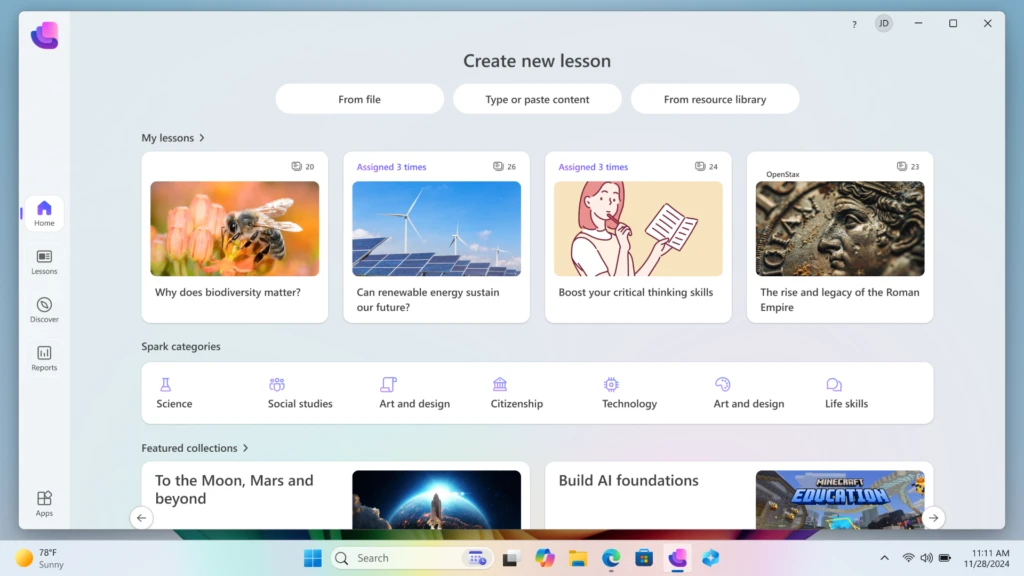
A significant differentiator for Windows 11 is its readiness for the AI era. Microsoft has introduced tools like the Learning Zone app, designed to utilize on-device AI to assist educators. Learning Zone allows teachers to transform existing materials—such as static slide decks or worksheets—into interactive, personalized lessons in a matter of minutes.
This application highlights a shift toward "Responsible AI" in education. Because these processes run on the device rather than exclusively in the cloud, student data remains private and the educator maintains full control over the content. Furthermore, Windows 11 integrates content from established educational partners including NASA, Minecraft Education, and Kahoot!, providing a rich repository of game-based and inquiry-based learning tools.
For institutions looking to maximize these capabilities, the Copilot+ PC represents the high-water mark of educational hardware. These devices feature dedicated Neural Processing Units (NPUs) that handle AI tasks locally, offering superior performance and battery life compared to traditional laptops. This investment in hardware ensures that schools are prepared for the next generation of educational software, which will increasingly rely on local AI processing.
Strategic Upgrade Paths and Financial Planning
Recognizing that every institution operates under different budgetary constraints, Microsoft has outlined three distinct paths for the transition:
- Direct Upgrade of Eligible Hardware: Schools can utilize the PC Health Check tool to identify existing devices that meet the TPM 2.0 and processor requirements. For these devices, the upgrade to Windows 11 is available at no additional cost via Microsoft Intune.
- Device Refresh via "Shape the Future": For hardware that has reached the end of its functional life, Microsoft’s "Shape the Future" program offers discounted Windows 11 PCs to K-12 institutions. To support sustainability, Microsoft encourages the use of trade-in and recycling programs, which can provide cashback to offset the cost of new equipment.
- Extended Security Updates (ESU): For institutions unable to complete their migration by the October 2025 deadline, the ESU program offers a temporary reprieve. For a fee—starting at $1 per device for the first year and increasing annually for up to three years—schools can continue receiving critical security patches for Windows 10. This tiered pricing is designed to provide an affordable "bridge" while institutions finalize their long-term hardware strategies.
Implications for the Future of Pedagogy
The shift to Windows 11 Education is likely to have long-term implications for how instruction is delivered. By providing a platform that handles the "heavy lifting" of data security and administrative management, the technology allows educators to focus on pedagogical innovation. The integration of AI tools suggests a future where personalized learning is the standard rather than the exception, with software capable of adapting to the individual pace and style of each student.
Furthermore, the emphasis on hardware-level security sets a new standard for student privacy. As digital footprints grow, the responsibility of institutions to protect student data becomes paramount. The move toward Windows 11 reflects a broader industry trend toward "Zero Trust" architecture, where security is integrated into every layer of the digital experience.
Conclusion
The impending end of support for Windows 10 serves as a catalyst for a broader modernization of global education. While the transition presents logistical challenges, the potential rewards in terms of security, efficiency, and AI-driven engagement are substantial. By planning now, educational institutions can ensure a seamless transition that not only protects their digital infrastructure but also empowers the next generation of learners with the tools necessary for a future defined by rapid technological change. The move to Windows 11 is not just an update to an operating system; it is a commitment to a more secure, equitable, and innovative educational future.