



The global educational landscape is currently navigating one of its most significant technological shifts as Microsoft accelerates the transition to Windows 11 Education. With the official end-of-support (EOS) date for Windows 10 set for October 14, 2025, educational institutions worldwide are being urged to modernize their digital infrastructure. This transition is not merely a version update; it represents a fundamental change in how schools manage cybersecurity, accessibility, and the integration of generative artificial intelligence into the pedagogical workflow. As classrooms become increasingly diverse and reliant on cloud-connected tools, the move to Windows 11 is designed to provide a secure, high-performing platform capable of scaling with the complex needs of modern districts.
The urgency of this transition is underscored by the evolving nature of digital threats facing the education sector. K-12 and higher education institutions have become primary targets for cyberattacks, necessitating hardware-level security that older operating systems can no longer provide. Simultaneously, the emergence of AI-powered tools like Microsoft’s Learning Zone and Copilot+ PCs offers a new frontier for personalized instruction. For IT administrators and educators, the coming year represents a critical planning window to ensure that learning remains uninterrupted and data remains protected.
A Chronology of the Windows Transition
The journey toward the current Windows 11 Education standard has been marked by several key milestones that reflect the broader trends in educational technology. In June 2021, Microsoft officially announced Windows 11, introducing stringent hardware requirements—most notably the Trusted Platform Module (TPM) 2.0—intended to create a "zero trust" security environment. By late 2021, the operating system became generally available, but many schools remained on Windows 10 to maximize the lifespan of existing hardware during the post-pandemic budget recovery phase.
Throughout 2023, large-scale deployments began to demonstrate the viability of the new system. A notable example is Ceibal, Uruguay’s national education innovation agency, which adopted Windows 11 as its primary operating system for more than 240,000 students and teachers. This move coincided with a dramatic rise in the use of their Learning Management System (LMS), CREA, which saw engagement jump from 55% in 2019 to 86% by early 2024. This period proved that a unified operating system could reduce maintenance costs by eliminating the need to manage multiple OS versions across disparate device models.
In May 2024, the introduction of Copilot+ PCs marked the next phase of the timeline, shifting the focus from basic connectivity to on-device AI processing. Looking ahead, the October 2025 deadline remains the most significant date for district planners, as it marks the point where Windows 10 will no longer receive security updates or technical support, potentially exposing schools to significant vulnerabilities.

Security by Design: Addressing the Modern Threat Landscape
The primary driver for the Windows 11 upgrade is a robust security architecture built from the chip to the cloud. Unlike previous iterations, Windows 11 requires modern hardware features that safeguard against sophisticated firmware attacks. The integration of TPM 2.0 ensures that encryption keys, credentials, and other sensitive data are protected behind a hardware barrier.
For school districts, this security is managed through Microsoft Intune, a cloud-based endpoint management solution. Intune allows IT departments to push security patches, manage device configurations, and monitor the health of thousands of student laptops from a centralized dashboard. This centralized approach is critical for reducing the "manual toil" often associated with IT maintenance in underfunded districts.
Furthermore, Microsoft Defender provides real-time protection that is natively integrated into the OS. By leveraging AI and machine learning, Defender can identify and neutralize emerging malware and ransomware threats before they disrupt the classroom environment. In an era where a single data breach can cost a school district millions of dollars and compromise student privacy, the "secure by design" philosophy of Windows 11 is framed as a non-negotiable standard for modern education.
The AI Frontier: Transforming Pedagogy with Learning Zone
While security provides the foundation, the integration of artificial intelligence is the most visible transformation within the Windows 11 ecosystem. Microsoft has positioned AI not as a replacement for teachers, but as a "co-pilot" designed to reduce administrative burdens and foster personalized learning.
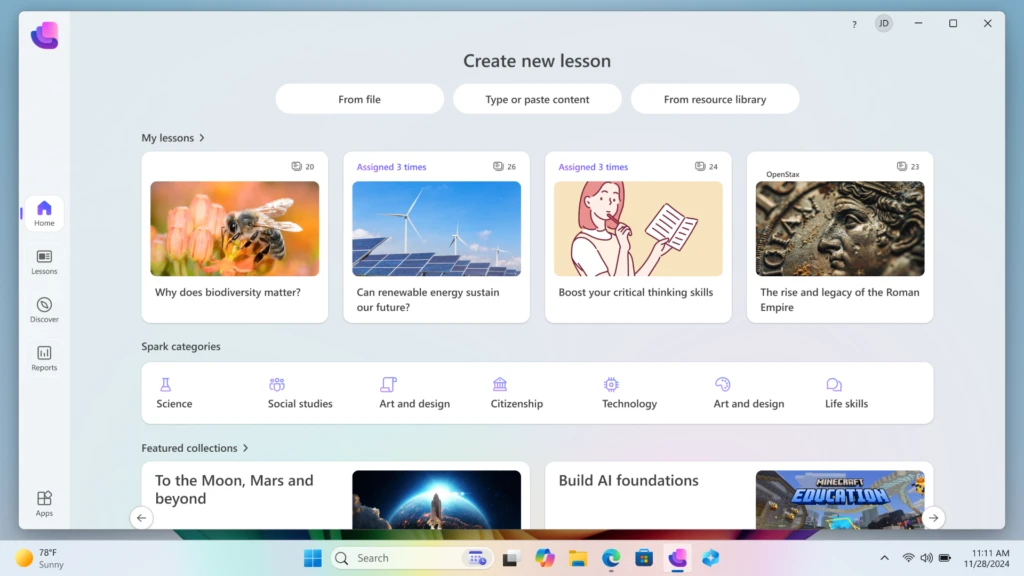
A central component of this strategy is the Microsoft Learning Zone, a Windows application currently in public preview. Built specifically for Copilot+ PCs, Learning Zone utilizes on-device NPU (Neural Processing Unit) technology to assist educators in content creation. This allows teachers to take existing materials—such as a static PDF worksheet or a PowerPoint presentation—and transform them into interactive, student-ready activities in a matter of minutes.
Crucially, because these AI experiences run on the device rather than exclusively in the cloud, they offer enhanced privacy. Student data is processed locally, ensuring that sensitive information does not leave the school’s controlled environment. This local processing also enables features like live captions and voice typing to function with minimal latency, supporting students with diverse learning needs and those for whom English is a second language.

Integration with third-party partners also enriches the platform. Tools from NASA, OpenStax, Minecraft Education, and Kahoot! are seamlessly integrated, allowing teachers to pull high-quality, trusted content directly into their AI-enhanced lessons. This ecosystem approach ensures that the technology serves the curriculum, rather than the curriculum being forced to adapt to the technology.
Strategic Upgrade Paths and Financial Planning
Recognizing that educational institutions operate on varying budget cycles, Microsoft has outlined three distinct paths for the transition to Windows 11. This flexibility is intended to prevent a "digital divide" where schools with fewer resources are left on unsupported software.
Option 1: In-Place Upgrades for Eligible Hardware
Many devices purchased within the last three to four years are already compatible with Windows 11. Microsoft provides the "PC Health Check" tool to help IT administrators audit their current fleets. For these eligible devices, the upgrade to Windows 11 is available at no additional licensing cost. This allows districts to unlock new security and accessibility features without capital expenditure on new hardware.
Option 2: Hardware Refresh and Sustainability
For older fleets, a hardware refresh is necessary. To mitigate the costs, Microsoft has promoted the "Shape the Future" program, which provides K-12 institutions with access to discounted Windows 11 devices. Additionally, the company emphasizes a "circular economy" approach, encouraging schools to utilize trade-in and recycling programs. These programs often provide cashback for old devices, which can be reinvested into the purchase of new Copilot+ PCs, while ensuring that electronic waste is handled responsibly.
Option 3: Phased Rollouts via Extended Security Updates (ESU)
For institutions that cannot complete their transition by the October 2025 deadline, Microsoft has introduced an Extended Security Update (ESU) program. This allows schools to pay a per-device fee to continue receiving critical security patches for Windows 10 for up to three years. The pricing for education customers is notably subsidized: $1 per device for the first year, $2 for the second, and $4 for the third. While this provides a temporary safety net, it is positioned as a bridge rather than a long-term solution.
Expert Analysis: The Implications of the Shift
Industry analysts suggest that the move to Windows 11 Education represents a pivotal moment for digital equity. By standardizing high-performance accessibility tools—such as built-in screen readers and focus sessions—Windows 11 lowers the barrier for students with disabilities. Furthermore, the efficiency of the new OS, which features improved battery life and faster boot times, addresses a common frustration in classrooms: the loss of instructional time due to technical delays.
The case study of Ceibal in Uruguay serves as a blueprint for other nations. Mateo Pérez, Product Coordinator at Ceibal, noted that prior to the migration, maintenance costs were high due to the fragmentation of OS versions across different device models. "By integrating Windows 11, everything became much quicker and simpler with added security," Pérez stated. This sentiment is echoed by IT directors globally who are seeking to consolidate their tech stacks to improve reliability.
However, the transition is not without its challenges. The hardware requirements of Windows 11 mean that some older, yet functional, devices will become obsolete for school use after 2025. This has prompted a surge in demand for sustainable disposal and repurposing strategies. The success of the Windows 11 rollout will likely depend on how effectively districts can leverage trade-in programs to offset the cost of new investments.
Conclusion: Preparing for the 2025 Deadline
The transition to Windows 11 Education is a multifaceted undertaking that requires early planning and a clear understanding of both technical and pedagogical goals. By focusing on a secure-by-design architecture and the transformative potential of on-device AI, Microsoft is attempting to future-proof the classroom against both cyber threats and the changing demands of the global workforce.
As the October 14, 2025, end-of-support date for Windows 10 approaches, the message from Microsoft is clear: the time for assessment and pilot programs is now. Whether through immediate hardware upgrades, phased rollouts via the ESU program, or the adoption of AI-ready Copilot+ PCs, schools have a variety of avenues to ensure they remain at the forefront of educational innovation. The goal is to move toward an environment where technology is an invisible but powerful facilitator of learning, allowing educators to focus on what they do best: inspiring the next generation of thinkers and creators.