
The global educational landscape is currently undergoing a fundamental shift as academic institutions navigate the intersection of increasing cybersecurity threats and the rapid emergence of generative artificial intelligence. As schools become more digitally integrated, the necessity for a cohesive, secure, and high-performing operating system has moved from a technical preference to a core institutional requirement. Microsoft has recently detailed its comprehensive strategy for the transition to Windows 11 Education, providing a roadmap for schools to modernize their infrastructure before the critical end-of-support deadline for Windows 10. This transition is not merely a software update but a strategic realignment designed to support diverse learning needs, multilingual classrooms, and the burgeoning demand for AI-assisted pedagogy.
The urgency of this transition is underscored by the looming deadline of October 14, 2025, the date on which Microsoft will officially cease support for Windows 10. For educational IT departments, this timeline necessitates immediate planning to ensure that student data remains protected and that instructional continuity is maintained. The move to Windows 11 Education is positioned as the primary solution to these challenges, offering a platform that integrates advanced security protocols with tools specifically designed for the modern classroom environment.
The Evolution of the Digital Classroom: A Chronology of Support
The journey toward the current educational technology standard began in October 2021 with the initial launch of Windows 11. Built on the same core architecture as its predecessor, the newer operating system was designed to address the specific vulnerabilities and performance limitations that surfaced during the global shift to remote learning in 2020. Over the last three years, Microsoft has iteratively refined the platform, introducing features such as Live Captions and Voice Typing to support accessibility and equity.
In mid-2024, the introduction of Copilot+ PCs marked a significant milestone in the Windows 11 lifecycle. These devices, equipped with dedicated Neural Processing Units (NPUs), represent the next phase of the "AI-ready" classroom. The chronology of this transition reflects a broader industry trend: the move away from centralized, cloud-only computing toward a hybrid model where on-device AI handles complex tasks locally to ensure user privacy and reduced latency. As the 2025 deadline approaches, institutions are now in the final phase of a multi-year transition period, moving from legacy systems to a platform capable of hosting the next generation of educational software.

Strengthening the Security Perimeter in Academic Environments
One of the most critical drivers for the Windows 11 upgrade is the escalating threat of cyberattacks targeting educational institutions. Schools often hold vast amounts of sensitive student data, making them prime targets for ransomware and data breaches. Windows 11 Education addresses these risks through a "Secure by Design" philosophy. Unlike previous iterations, Windows 11 requires hardware-level security features, most notably the Trusted Platform Module (TPM) 2.0. This silicon-level protection provides a foundation for identity verification and encryption that is significantly harder to bypass than software-only solutions.
Furthermore, the integration of Microsoft Defender provides real-time, automated updates that respond to evolving digital risks without requiring constant manual intervention from IT staff. For large school districts managing thousands of devices, this automation is essential. Centralized management through Microsoft Intune allows IT administrators to deploy security patches, manage app permissions, and ensure compliance across a diverse fleet of devices from a single dashboard. This reduction in administrative overhead is a key factor for institutions operating with limited technical staff, allowing them to pivot from reactive troubleshooting to proactive system optimization.
AI-Powered Pedagogy and the Learning Zone Initiative
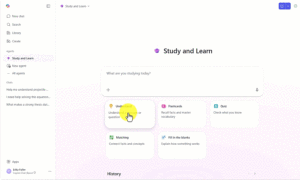
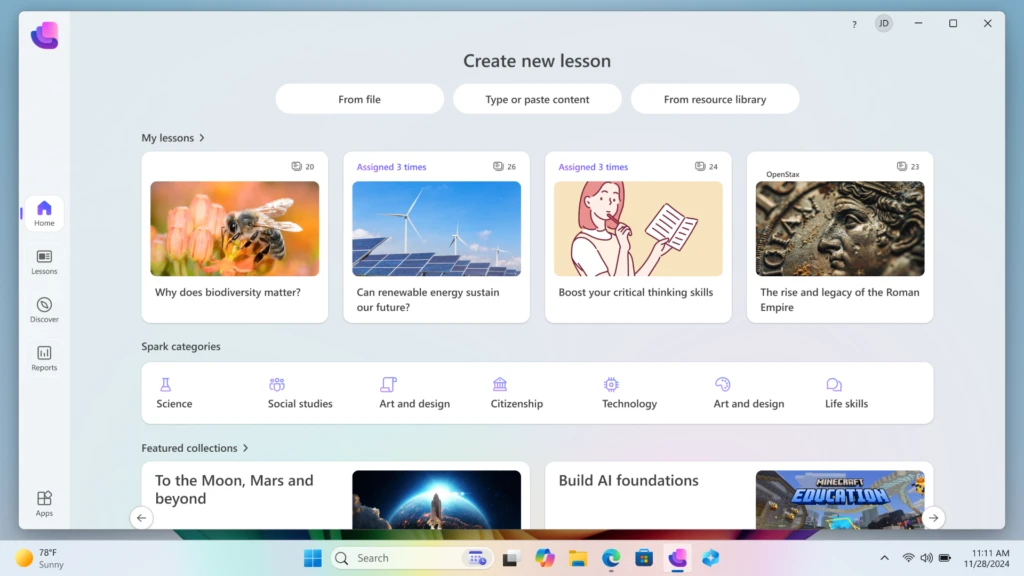
As artificial intelligence becomes an integral component of the professional world, educators are seeking ways to introduce these tools into the classroom responsibly. Windows 11 Education facilitates this through the Microsoft Learning Zone, a dedicated application designed for Copilot+ PCs. Learning Zone utilizes on-device AI to assist educators in creating personalized, interactive lessons. By processing data locally on the device’s NPU, the system ensures that student information never leaves the machine, addressing one of the primary ethical concerns surrounding AI in schools: data privacy.
The Learning Zone platform allows teachers to transform traditional materials—such as static PDFs or slide decks—into engaging activities in a matter of minutes. This capability is complemented by integrations with established educational partners, including NASA, OpenStax, Minecraft Education, and Kahoot!. These partnerships provide a library of trusted, curriculum-aligned content that can be tailored to individual student needs. The objective is to use AI not to replace the teacher, but to automate time-consuming administrative and preparatory tasks, thereby allowing educators to focus on direct student engagement and differentiated instruction.
Case Study: Scaling Digital Access in Uruguay
The practical implications of a nationwide transition to Windows 11 are perhaps best illustrated by Ceibal, Uruguay’s national agency for digital education. As the largest Microsoft Education tenant in Latin America, Ceibal faced the monumental task of universalizing digital access for the country’s public education system. In 2023, the agency adopted Windows 11 as its primary operating system, deploying it to more than 240,000 students and teachers.

The results of this migration provided significant data points regarding institutional efficiency. According to Ceibal’s 2024 statistics, usage of their Learning Management System (LMS), known as CREA, rose from 55% in 2019 to 86% following the full integration of Windows 11. Mateo Pérez, Product Coordinator at Ceibal, noted that the move solved a long-standing issue of fragmentation. Previously, maintenance costs were high because various device models ran different versions of the OS. By standardizing on Windows 11, the agency achieved better hardware-software compatibility, streamlined update cycles, and enhanced overall system security. This case study serves as a blueprint for other national or district-level organizations looking to scale digital learning initiatives.
Strategic Transition Pathways and Financial Considerations
Recognizing that budget cycles and hardware lifecycles vary significantly across institutions, Microsoft has outlined three distinct paths for the transition away from Windows 10. These options are designed to provide flexibility while maintaining the 2025 security deadline.
Option 1: In-Place Upgrades for Eligible Hardware
Many devices currently in use are already compatible with Windows 11. Microsoft provides the "PC Health Check" tool to help IT departments audit their current inventory. For eligible devices, the upgrade to Windows 11 is available at no additional licensing cost. This allows schools to unlock modern security and accessibility features without immediate capital expenditure on new hardware.
Option 2: Device Refresh and Sustainability Programs
For older hardware that does not meet the TPM 2.0 requirement, a device refresh is necessary. To mitigate the financial impact, the "Shape the Future" program offers K-12 institutions access to discounted Windows 11 PCs. Additionally, Microsoft has emphasized sustainability through trade-in and recycling programs. These initiatives allow schools to receive cashback for old devices, which can then be reinvested into new purchases, while ensuring that end-of-life hardware is processed in an environmentally responsible manner.
Option 3: Extended Security Updates (ESU)
For institutions that cannot complete their transition by October 2025, Microsoft has introduced an Extended Security Update program. This allows Windows 10 devices to continue receiving critical security patches for up to three years post-deadline. In a significant move for the education sector, Microsoft has set the ESU pricing for academic customers at a highly subsidized rate: $1 per device for the first year, $2 for the second, and $4 for the third. This tiered pricing is intended to act as a bridge, ensuring that no student is left vulnerable during the phasing out of older technology.
Broader Implications for Global Digital Equity
The transition to Windows 11 Education carries broader implications for digital equity and the future of the global workforce. By providing tools like live captions, screen readers, and AI-driven personalized learning, the platform aims to level the playing field for students with disabilities and those from non-native speaking backgrounds. In an increasingly competitive global economy, proficiency with modern operating systems and AI tools is becoming a prerequisite for employment.
Industry analysts suggest that the move toward AI-integrated platforms will redefine the classroom experience over the next decade. The shift from "computer labs" to pervasive, secure, on-device computing reflects a move toward making technology an invisible but essential utility for learning. However, the success of this transition depends heavily on the readiness of institutional infrastructure and the continuous professional development of educators.
Conclusion: Preparing for the Post-Windows 10 Era
As the October 2025 deadline approaches, the window for strategic planning is narrowing. The transition to Windows 11 Education represents a pivotal moment for institutional leaders to evaluate their long-term digital strategy. By focusing on a foundation of hardware-backed security, accessibility, and responsible AI integration, Microsoft is positioning Windows 11 as more than just an operating system; it is being framed as a comprehensive environment for academic growth.
While the technical challenges of a large-scale migration are non-trivial, the potential benefits—reduced maintenance costs, enhanced data protection, and access to cutting-edge pedagogical tools—present a compelling case for early adoption. For school districts and higher education institutions alike, the move to Windows 11 is a necessary step in ensuring that the next generation of learners is equipped for a future that is increasingly digital, secure, and AI-driven. Planning for this shift today is the most effective way to ensure that the classrooms of tomorrow remain safe, inclusive, and ready for innovation.