


The global educational landscape is currently undergoing a fundamental shift, moving away from traditional static instruction toward a dynamic, digital-first ecosystem that prioritizes personalized learning and robust cybersecurity. As schools and universities worldwide grapple with increasingly sophisticated digital threats and the rapid integration of artificial intelligence, Microsoft has positioned Windows 11 Education as the primary vehicle for this transition. With the official end-of-support (EOS) date for Windows 10 looming on October 14, 2025, educational institutions are facing a critical inflection point. The move to Windows 11 is no longer presented merely as a routine software update, but as a strategic necessity to ensure institutional security, foster digital equity, and harness the capabilities of next-generation AI tools.
The 2025 Deadline and the Impetus for Change
The urgency surrounding the transition to Windows 11 is driven by the lifecycle of its predecessor. Windows 10, which has served as the backbone of school IT infrastructure for nearly a decade, will cease to receive free security updates, bug fixes, or technical support in late 2025. For IT administrators managing thousands of devices across sprawling districts, this creates a significant compliance and security risk. Operating on an unsupported OS exposes student records, financial data, and proprietary research to vulnerabilities that can be exploited by ransomware and phishing campaigns.
In response to this timeline, Microsoft has outlined a multi-tiered strategy designed to help institutions of varying sizes and budgets migrate to a more resilient environment. The shift is characterized by a "secure-by-design" philosophy, moving away from reactive security measures toward proactive, hardware-integrated protection. This transition comes at a time when educational institutions are increasingly targeted by cybercriminals; recent industry data suggests that the education sector experienced a significant rise in weekly cyberattacks compared to other industries, largely due to the high volume of sensitive data and often-underfunded IT departments.
A Chronology of Modern Educational Computing
To understand the significance of the Windows 11 Education rollout, one must look at the evolution of the platform over the last decade. In 2015, Windows 10 was launched with a focus on "Software as a Service," aiming to provide a consistent experience across devices. However, the rise of remote learning during the 2020-2022 period exposed gaps in legacy systems, particularly regarding battery life, remote management, and accessibility.

Windows 11 was introduced in late 2021 as a response to these emerging needs. It brought stricter hardware requirements, most notably the mandate for Trusted Platform Module (TPM) 2.0. While initially controversial due to its impact on older hardware, this requirement was a calculated move to establish a baseline of hardware-level security. By 2023, Microsoft began integrating generative AI through Copilot, signaling a pivot from a pure operating system to an AI-augmented productivity platform. As of 2024, the focus has shifted toward "AI at the edge," where processing happens on the device rather than the cloud, a development that is central to the new Windows 11 Education experience.
Security Architecture and Institutional Management
The primary value proposition of Windows 11 Education lies in its defensive architecture. At the core of this system is Microsoft Defender, which provides real-time protection powered by cloud-based heuristics. Unlike legacy antivirus software that relied on known threat signatures, modern Defender uses machine learning to identify anomalous behavior, a critical feature for defending against "zero-day" exploits.
Furthermore, the integration of Microsoft Intune allows for centralized, cloud-based management. This is particularly relevant for large-scale deployments where IT staff may be limited. Intune enables administrators to push updates, manage app permissions, and enforce security policies across thousands of devices simultaneously, regardless of whether the students are on-campus or learning from home. This level of oversight reduces the "attack surface" of a school district by ensuring that every device meets the same security standards.
The inclusion of hardware-level security, such as TPM 2.0 and Secure Boot, ensures that the system’s integrity is verified from the moment the power button is pressed. These features are designed to prevent "rootkits" and other low-level malware that can bypass traditional software-based security. For educational institutions, this means a significant reduction in the manual labor required to maintain system health and a lower likelihood of costly data breaches.
Scaling Digital Literacy: The Ceibal Case Study
The real-world efficacy of Windows 11 Education is perhaps best illustrated by Ceibal, Uruguay’s national innovation center for education. As the largest Microsoft Education tenant in Latin America, Ceibal faced the monumental task of providing digital access to every student in the public school system. In 2023, the agency adopted Windows 11 as its primary operating system, deploying it to over 240,000 students and teachers.

The results of this migration provide a data-driven blueprint for other nations. According to Ceibal’s 2024 statistics, the usage rate of their Learning Management System (LMS), known as CREA, climbed from 55% in 2019 to 86% in 2024. This increase in engagement is attributed to the improved performance and reliability of the Windows 11 platform. Mateo Pérez, Product Coordinator at Ceibal, noted that the transition simplified IT operations significantly. Prior to the migration, maintenance costs were inflated because different device models required different OS versions. By standardizing on Windows 11, the agency achieved greater software-hardware compatibility and reduced the overhead associated with troubleshooting legacy systems.
The Rise of AI-Powered Pedagogy and Copilot+ PCs
As the educational sector moves beyond basic digital literacy, the focus is shifting toward AI integration. Windows 11 Education is designed to support this through the introduction of Copilot+ PCs. These devices are equipped with Neural Processing Units (NPUs) capable of performing billions of operations per second, allowing AI tasks to run locally on the device.
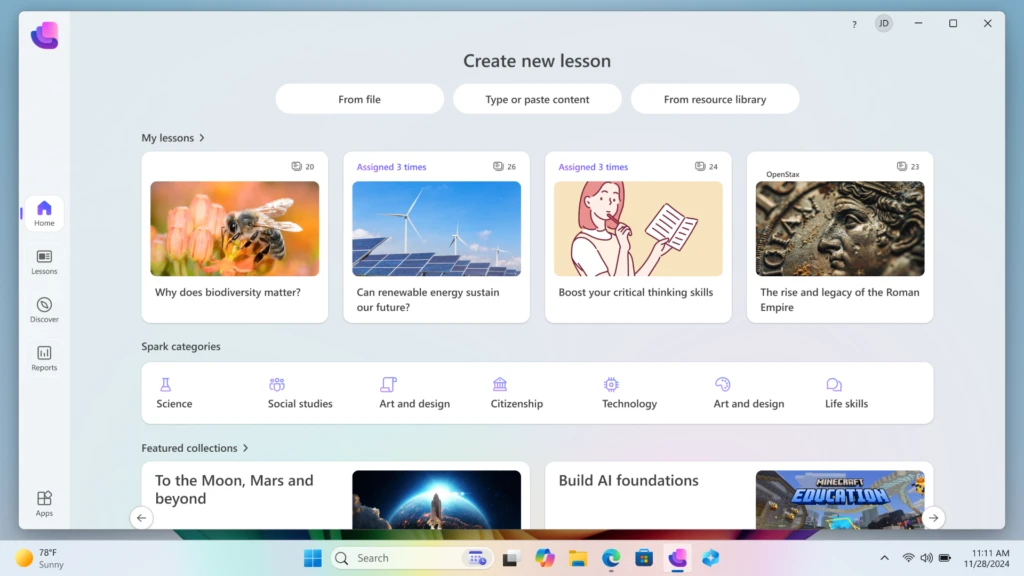
A key innovation in this space is the Microsoft Learning Zone. This application, currently in public preview, allows educators to use on-device AI to transform existing materials—such as PDFs or slide decks—into interactive lessons. Because the AI processing happens on the device, student data remains private and secure, addressing one of the primary concerns educators have regarding generative AI.
The platform also integrates third-party content from established educational partners. For example, Minecraft Education offers immersive game-based learning environments, while NASA provides hands-on exploration modules. Tools like Kahoot! have also integrated AI to generate instant quizzes, reducing the administrative burden on teachers and allowing them to focus more on direct student interaction. This "AI-ready" infrastructure is intended to future-proof institutions, ensuring they can adopt new pedagogical tools without needing a hardware overhaul every few years.
Strategic Upgrade Paths and Financial Considerations
Recognizing that many schools operate on tight multi-year budget cycles, Microsoft has introduced three distinct paths for the Windows 11 transition.
- Eligible Device Upgrades: Schools can use the PC Health Check tool to identify existing hardware that meets Windows 11 requirements. For these devices, the upgrade is available at no additional cost through Microsoft Intune.
- Device Refresh and Sustainability: For hardware that does not meet the new requirements, Microsoft encourages a "trade-in and recycle" approach. Programs like "Shape the Future" provide discounts on new Windows 11 PCs for K-12 institutions, helping to bridge the digital divide. Additionally, recycling programs help schools meet sustainability goals by ensuring old hardware is disposed of responsibly.
- Extended Security Updates (ESU): For institutions that cannot complete the transition by October 2025, Microsoft is offering an ESU program. In a notable move to support the education sector, ESU pricing for schools is significantly lower than for commercial enterprises. Licenses start at $1 per device for the first year, $2 for the second, and $4 for the third. This phased approach allows districts to spread the cost of hardware replacement over several years while remaining protected against security threats.
Analysis of Implications: Equity and the Digital Divide
The transition to Windows 11 Education carries broader implications for global digital equity. While the hardware requirements ensure a high standard of security and performance, they also present a challenge for underfunded districts that may be reliant on aging hardware. Microsoft’s discounted ESU pricing and "Shape the Future" program are direct attempts to mitigate this risk, but the success of these initiatives will depend on local implementation and government funding.
From a pedagogical perspective, the move toward AI-integrated operating systems could redefine the role of the educator. By automating routine tasks like lesson plan generation and quiz creation, Windows 11 Education aims to return time to teachers. However, this also necessitates a significant investment in professional development. Technology is only as effective as the person utilizing it, and the shift to AI-powered learning will require educators to develop new fluencies in AI prompt engineering and data privacy management.
Conclusion: Preparing for the Post-2025 Era
The migration to Windows 11 Education represents a systemic upgrade to the foundation of modern schooling. By combining advanced hardware-level security with localized AI capabilities, the platform seeks to address the dual challenges of rising cyber threats and the need for more personalized instruction. As the 2025 deadline for Windows 10 approaches, the focus for educational leaders must shift from "if" they will upgrade to "how" they will leverage the new platform to improve student outcomes.
Ultimately, the transition is about more than just software; it is about creating a resilient, scalable, and inclusive environment that can adapt to the unknown technological shifts of the next decade. With tools like Intune for management, Copilot for productivity, and the ESU program for flexibility, Microsoft has provided a comprehensive framework for this transition. The onus now lies with institutional leaders to plan and execute a move that secures their data today while empowering their students for tomorrow.