



The global educational landscape is currently undergoing a significant technological shift as institutions prepare for the conclusion of support for the Windows 10 operating system on October 14, 2025. This transition, spearheaded by Microsoft’s push toward Windows 11 Education, represents more than a routine software update; it is a strategic move to address the escalating cybersecurity threats facing school districts and the rapid integration of generative artificial intelligence (AI) in the classroom. As school administrators and IT professionals navigate a complex digital environment characterized by diverse learning needs and multilingual student populations, the migration to Windows 11 is being positioned as a foundational step toward "future-ready" learning environments.
The Impending Deadline for Windows 10 and the Urgency of Modernization
The countdown to the Windows 10 End of Support (EOS) date serves as a critical inflection point for the education sector. After October 2025, devices running Windows 10 will no longer receive monthly security updates, technical support, or bug fixes, leaving them vulnerable to emerging cyber threats. For K-12 and higher education institutions, which handle vast amounts of sensitive student data and intellectual property, the risks of operating on unsupported software are substantial.
Microsoft has structured the transition to Windows 11 to align with the evolving demands of the modern classroom. Today’s educational settings are increasingly reliant on digital-first instruction, requiring platforms that are not only secure but also capable of supporting high-performance AI tools. The shift to Windows 11 is designed to simplify IT management while promoting equity through advanced accessibility features and personalized learning pathways.
A Chronology of the Windows Transition in Education
To understand the current urgency, it is necessary to examine the timeline of Microsoft’s operating system lifecycle and its impact on the educational sector.

- July 2015: Windows 10 is launched, becoming the standard for educational computing for the next decade.
- October 2021: Windows 11 is released, introducing stricter hardware requirements, including the necessity for Trusted Platform Module (TPM) 2.0 to enhance security.
- 2023-2024: The rise of generative AI transforms pedagogical expectations, leading to the development of Copilot and AI-integrated hardware.
- October 14, 2025: The official End of Support for Windows 10, necessitating a full migration or enrollment in extended security programs.
- 2025-2028: The planned window for the Extended Security Update (ESU) program, providing a three-year bridge for institutions unable to complete hardware refreshes by the 2025 deadline.
Strengthening Institutional Cybersecurity through Hardware-Rooted Protections
As schools become frequent targets for ransomware and data breaches, the security architecture of Windows 11 offers a "secure-by-design" approach. Unlike previous iterations, Windows 11 mandates hardware-level security features. The inclusion of TPM 2.0 ensures that cryptographic keys, passwords, and digital certificates are stored in a physical chip, making them significantly harder for attackers to access.
Furthermore, Microsoft Defender provides real-time, cloud-based protection that updates automatically. For IT administrators, the integration of Microsoft Intune allows for centralized management of entire device fleets. This capability is particularly vital for large districts where manual updates are labor-intensive and prone to error. By standardizing the operating system across a district, IT teams can reduce the time spent on troubleshooting and maintenance, redirected resources toward instructional support.
Leveraging AI-Powered Experiences for Personalized Pedagogy
One of the primary drivers for the Windows 11 upgrade is the integration of on-device AI. Microsoft has introduced "Copilot+ PCs," a new category of Windows 11 devices designed specifically for AI-intensive workloads. These devices utilize Neural Processing Units (NPUs) to run AI models locally rather than relying solely on the cloud.
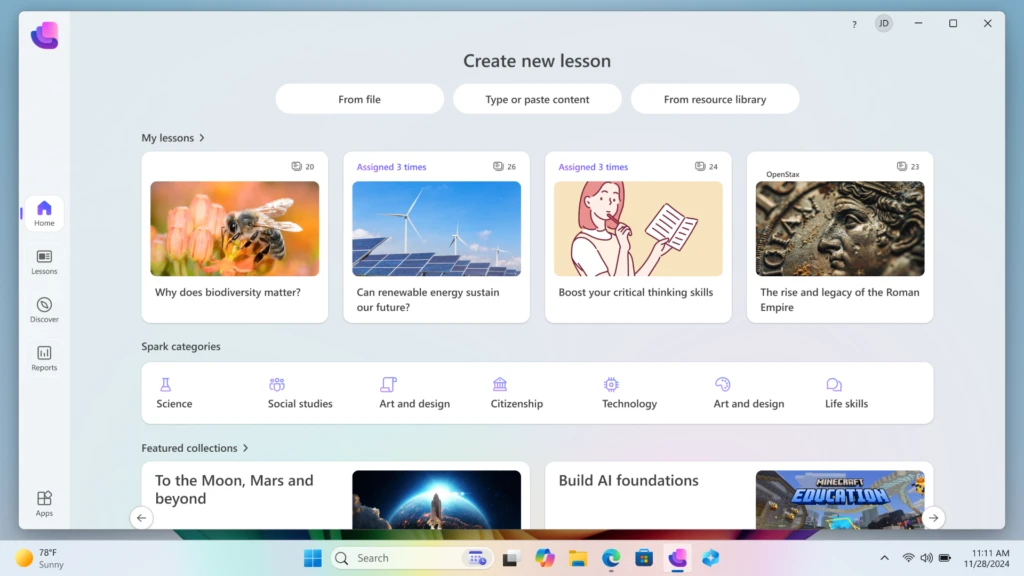
A centerpiece of this AI strategy is the Microsoft Learning Zone, currently in public preview. This application allows educators to transform existing materials, such as static slide decks or PDF worksheets, into interactive, student-ready activities in a matter of minutes. Because the AI processing occurs on the device, it maintains a higher standard of data privacy—a critical concern for educational institutions bound by regulations such as the Family Educational Rights and Privacy Act (FERPA).
The platform also integrates content from global partners, including:

- NASA: Providing hands-on exploration modules.
- OpenStax (Rice University): Offering peer-reviewed, open-source curriculum materials.
- Minecraft Education: Delivering immersive, game-based learning environments.
- Kahoot!: Utilizing AI to generate instant quizzes based on lesson content.
Case Study: Large-Scale Digital Transformation in Uruguay
The practical benefits of this transition are evidenced by Ceibal, Uruguay’s national agency for digital education. As the largest Microsoft Education tenant in Latin America, Ceibal initiated a massive migration to Windows 11 in 2023. By 2024, more than 240,000 students and teachers across the country were utilizing Windows 11 PCs.
The data from this migration indicates a significant impact on engagement and operational efficiency. Usage rates for Ceibal’s Learning Management System (LMS), CREA, rose from 55% in 2019 to 86% in 2024. Mateo Pérez, Product Coordinator at Ceibal, noted that the move solved significant fragmentation issues. "Prior to moving to Windows 11, maintenance and update costs were higher because each device model had its own OS version," Pérez stated. He emphasized that the integration made IT operations "much quicker and simpler with added security."
Strategic Upgrade Paths and Financial Planning
Recognizing that budget cycles and hardware lifecycles vary, Microsoft has outlined three primary paths for institutions to achieve compliance before the 2025 deadline.
Option 1: In-Place Upgrades for Eligible Hardware
Many devices currently running Windows 10 are compatible with Windows 11. Institutions can utilize the "PC Health Check" tool to identify eligible hardware. For these devices, the upgrade to Windows 11 is available at no additional licensing cost, allowing schools to unlock performance improvements and accessibility tools like live captions and voice typing immediately.
Option 2: Device Refresh and Sustainable Disposal
For aging hardware that does not meet the TPM 2.0 requirement, a full device refresh is recommended. To mitigate the financial burden, Microsoft’s "Shape the Future" program offers discounted Windows 11 Pro Education devices to K-12 institutions. Additionally, Microsoft has partnered with various Original Equipment Manufacturers (OEMs) to provide trade-in programs and responsible recycling initiatives, helping schools meet sustainability goals while reclaiming value from old hardware.
Option 3: The Extended Security Update (ESU) Program
For institutions that cannot replace their entire fleet by October 2025, the ESU program provides a temporary reprieve. This program allows devices to continue receiving critical and important security updates for up to three years. In a move to support the education sector, Microsoft has set the ESU pricing for education customers at a significantly lower rate than commercial tiers:
- Year 1: $1 per device
- Year 2: $2 per device
- Year 3: $4 per device
This tiered pricing structure is designed to provide a low-cost bridge for schools to phase out their Windows 10 devices over time without compromising network security.
Analysis of Implications for Global Education
The transition to Windows 11 Education signals a broader shift in the philosophy of educational technology. It moves the conversation from "access to devices" to "access to intelligent platforms." The emphasis on AI and hardware-level security suggests that the industry is moving away from a one-size-fits-all software model toward a more adaptive, personalized experience.
However, the transition is not without challenges. The hardware requirements of Windows 11 could potentially exacerbate the digital divide if schools in lower-income districts struggle to fund hardware refreshes. Microsoft’s discounted ESU pricing and the "Shape the Future" program are direct attempts to mitigate this risk, but the success of the transition will ultimately depend on the ability of local governments and school boards to align their long-term IT strategies with these available resources.
Furthermore, the introduction of AI tools like Learning Zone necessitates a parallel investment in professional development for teachers. While the technology promises to save time, its effectiveness is contingent upon educators knowing how to integrate these AI-generated activities into their pedagogical frameworks responsibly.
Conclusion
As the October 2025 deadline approaches, the migration to Windows 11 Education stands as a pivotal moment for schools worldwide. By combining enhanced security protocols with the creative potential of generative AI, the platform aims to provide a robust foundation for the next generation of learners. Whether through immediate hardware upgrades, the adoption of Copilot+ PCs, or the strategic use of Extended Security Updates, the goal remains the same: ensuring that the digital tools used by students and teachers are as secure, efficient, and innovative as the education they are designed to support. Planning for this transition today is essential for maintaining the continuity and integrity of the educational experience tomorrow.