


The global educational landscape is currently navigating a critical technological inflection point as institutions face the dual challenge of evolving cybersecurity threats and the rapid integration of artificial intelligence into the classroom. With the official end of support for Windows 10 scheduled for October 14, 2025, school districts, higher education institutions, and ministries of education worldwide are being urged to finalize their migration plans to Windows 11 Education. This transition represents more than a routine software update; it is a foundational shift toward a more secure, AI-ready, and inclusive pedagogical environment. As educators increasingly manage diverse, multilingual classrooms with varying learning needs, the demand for high-performing, reliable technology has never been more acute. Microsoft’s latest operating system is designed to meet these needs by simplifying IT management, supporting digital equity, and providing the hardware-level security required to protect sensitive student data in an era of increasing cyber volatility.
The Impetus for Change: Security and the Modern Classroom
The move to Windows 11 Education is primarily driven by a "secure by design" philosophy. In recent years, educational institutions have become prime targets for cyberattacks, including ransomware and data breaches. Unlike its predecessors, Windows 11 mandates specific hardware-level security features, most notably the Trusted Platform Module (TPM) 2.0. This silicon-level security ensures that the device’s identity is protected and that the boot process is not compromised by malicious code.
Beyond hardware, the software ecosystem includes Microsoft Defender, which offers real-time, cloud-backed protection that updates automatically. For IT administrators, the integration with Microsoft Intune for Education allows for centralized management of thousands of devices. This capability is critical for school districts where a small IT team may be responsible for a vast fleet of laptops across multiple campuses. By promoting consistency and reducing the time spent on manual troubleshooting, institutions can lower their total cost of ownership (TCO) while ensuring that every student has a secure and functional device.
A Chronology of the Windows Transition in Education
To understand the urgency of the current migration, one must look at the timeline of Microsoft’s operating system lifecycle and its historical impact on the education sector.

- July 2015: Windows 10 is launched, becoming the bedrock for the massive digital transformation seen in schools over the next decade.
- 2020-2021: The global pandemic triggers an unprecedented surge in device procurement. Millions of Windows 10 laptops are deployed to support remote learning, many of which are now reaching the end of their four-to-five-year hardware lifecycle.
- October 2021: Windows 11 is released, introducing the TPM 2.0 requirement and a new user interface optimized for touch and accessibility.
- 2023: Early adopters in the education sector, such as Ceibal in Uruguay, begin large-scale deployments of Windows 11, reporting significant gains in engagement and system performance.
- May 2024: Microsoft introduces Copilot+ PCs, marking the beginning of the "AI PC" era with dedicated Neural Processing Units (NPUs) for on-device AI tasks.
- October 14, 2025: Official End of Support (EOS) for Windows 10. After this date, devices will no longer receive security updates, leaving them vulnerable to new exploits.
Case Study: Scalable Digital Transformation in Uruguay
The most compelling evidence for the efficacy of Windows 11 in a large-scale educational setting comes from Uruguay. Ceibal, the national agency responsible for the integration of technology into the public education system, manages the largest Microsoft education tenant in Latin America. In 2023, Ceibal moved to universalize Windows 11 as its primary operating system, deploying it to more than 240,000 students and teachers.
The results of this migration were measurable. Usage rates for their Learning Management System (LMS), known as CREA, rose from 55% in 2019 to 86% by early 2024. According to Mateo Pérez, Product Coordinator at Ceibal, the transition solved a major logistical headache: fragmentation. Previously, the agency had to manage multiple OS versions across different device models, leading to high maintenance costs and software compatibility issues. By standardizing on Windows 11, the agency reduced maintenance overhead and improved the reliability of student devices, ensuring that technology served as a tool for learning rather than a barrier.
The AI Frontier: Copilot+ PCs and Learning Zone
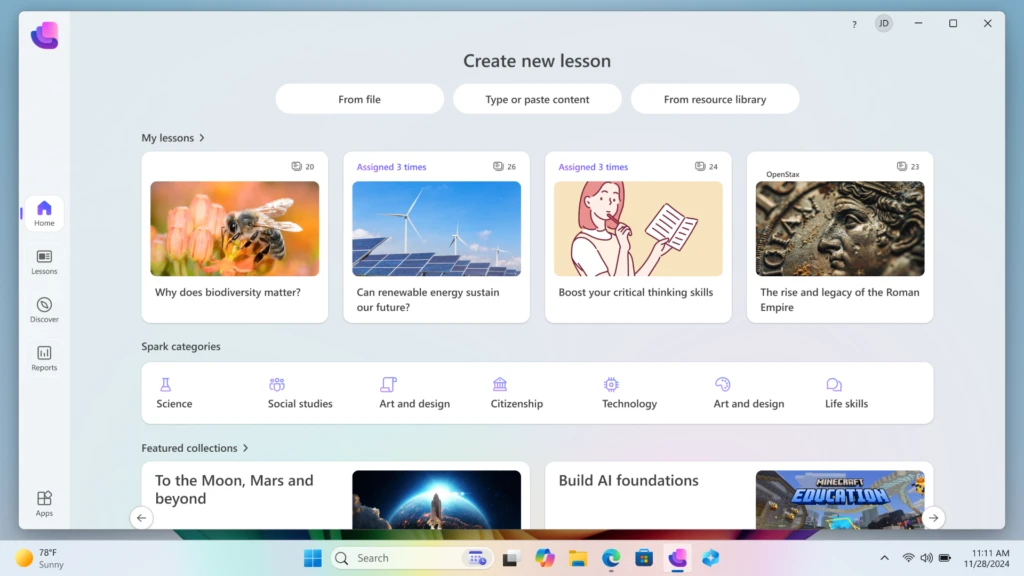
One of the most significant enrichments to the Windows 11 ecosystem is the introduction of AI-powered experiences designed specifically for the classroom. The new "Learning Zone" app, currently in public preview, exemplifies how Windows 11 utilizes on-device AI to assist educators. Built for Copilot+ PCs, Learning Zone allows teachers to transform existing materials—such as a static PDF worksheet or a PowerPoint deck—into interactive, personalized lessons in a matter of minutes.
Crucially, because these AI processes run on the device’s NPU rather than the cloud, student privacy is maintained, and data remains within the school’s control. This "on-device AI" approach addresses one of the primary concerns educators have regarding generative AI: the security of minor students’ data. Furthermore, Windows 11 integrates AI-driven accessibility tools like live captions and voice typing, which are essential for supporting multilingual learners and students with diverse accessibility needs. Partnerships with organizations like NASA, OpenStax, and Minecraft Education further ensure that teachers have a wealth of vetted, high-quality content at their fingertips.
Strategic Pathways for Institutional Upgrades
Recognizing that every school district operates under different budgetary constraints, Microsoft has outlined three distinct paths for the transition from Windows 10 to Windows 11.

1. In-Place Upgrades for Eligible Hardware
Many devices purchased within the last three to four years are already compatible with Windows 11. IT departments can use the "PC Health Check" tool to identify these devices and deploy the upgrade via Microsoft Intune at no additional cost. This path allows schools to maximize their existing hardware investments while gaining the performance and security benefits of the new OS.
2. Device Refresh and Sustainability
For older hardware that does not meet the TPM 2.0 requirement, a device refresh is necessary. To mitigate the environmental and financial impact, Microsoft has promoted trade-in and recycling programs through various OEM partners. Additionally, the "Shape the Future" program provides K-12 institutions with access to discounted Windows 11 devices, helping to bridge the digital divide in underserved communities.
3. The Extended Security Update (ESU) Program
For institutions that cannot complete their migration by the October 2025 deadline, Microsoft is offering a phased rollout option through the ESU program. This allows Windows 10 devices to continue receiving critical security patches for up to three years. For education customers, the pricing is structured to be highly accessible: $1 per device for the first year, doubling to $2 in the second year, and $4 in the third. This provides a safety net for large districts requiring more time to secure funding or manage logistics.
Analysis of Implications: Equity, Productivity, and Performance
The transition to Windows 11 Education carries broad implications for the future of the teaching profession. As administrative burdens on teachers continue to grow, the role of technology must shift from a "digital textbook" to a "digital assistant." The performance enhancements in Windows 11—including faster boot times and extended battery life—are not merely technical specs; they represent instructional minutes saved. In a typical school day, the five minutes lost to slow logins or system crashes can accumulate into hours of lost learning time over a school year.
Furthermore, the focus on AI readiness suggests a long-term shift in how curriculum is delivered. By providing a platform that can handle complex AI tasks locally, Windows 11 enables a level of differentiated instruction that was previously impossible for a single teacher to manage in a classroom of 30 students.
Industry analysts suggest that the move toward Windows 11 will also force a standardization of security protocols across the education sector. As schools adopt the hardware-backed security of TPM 2.0 and the cloud-based management of Intune, the "low-hanging fruit" for cybercriminals will diminish. This shift is likely to lead to more stable insurance premiums for school districts and, more importantly, a safer digital environment for children.
Conclusion: A Call for Proactive Planning
While October 2025 may seem distant, the complexity of upgrading thousands of devices requires immediate action. A well-managed transition can result in a more resilient infrastructure, empowered educators, and more engaged students. The move to Windows 11 Education is an investment in the next generation of digital citizenship, providing the tools necessary for students to thrive in a world where AI and secure digital collaboration are the norms. Microsoft’s commitment to supporting schools through flexible pricing, free planning tools, and specialized AI software underscores the importance of this migration. As the deadline approaches, the focus for educational leaders must remain on ensuring that no student is left behind on an unsupported and insecure platform.