




The integration of artificial intelligence into modern classrooms has long presented a paradox for educators, school administrators, and institutional leaders. While students increasingly turn to generative AI tools for homework assistance, exam preparation, and essay writing, the vast majority of commercially available software prioritizes speed over comprehension. These general-purpose platforms often function as mere "answer bots," bypassing the cognitive friction essential for genuine learning. In response, academic institutions worldwide have frequently resorted to blanket bans and restrictive access policies to prevent academic dishonesty and intellectual erosion.
Addressing this pedagogical dilemma, Microsoft has officially launched the Study and Learn Agent, a purpose-built educational tool integrated directly into Microsoft 365 Copilot. Available generally at no additional cost for education customers with existing Microsoft 365 licensing, the new agent seeks to reframe artificial intelligence as an interactive coach rather than a shortcut. Designed specifically for students aged 13 and older, the system anchors its operational framework in established learning science, ensuring that the cognitive workload remains firmly with the student.
The Introduction of Purpose-Built Educational AI
The rollout of the Study and Learn Agent marks a significant shift in how technology developers approach the K-12 and higher education markets. Rather than attempting to adapt a general-purpose consumer chatbot for classroom use, Microsoft collaborated with educational experts to develop an infrastructure rooted in cognitive psychology. The core philosophy driving the platform is deceptively simple: the learner must do the thinking.
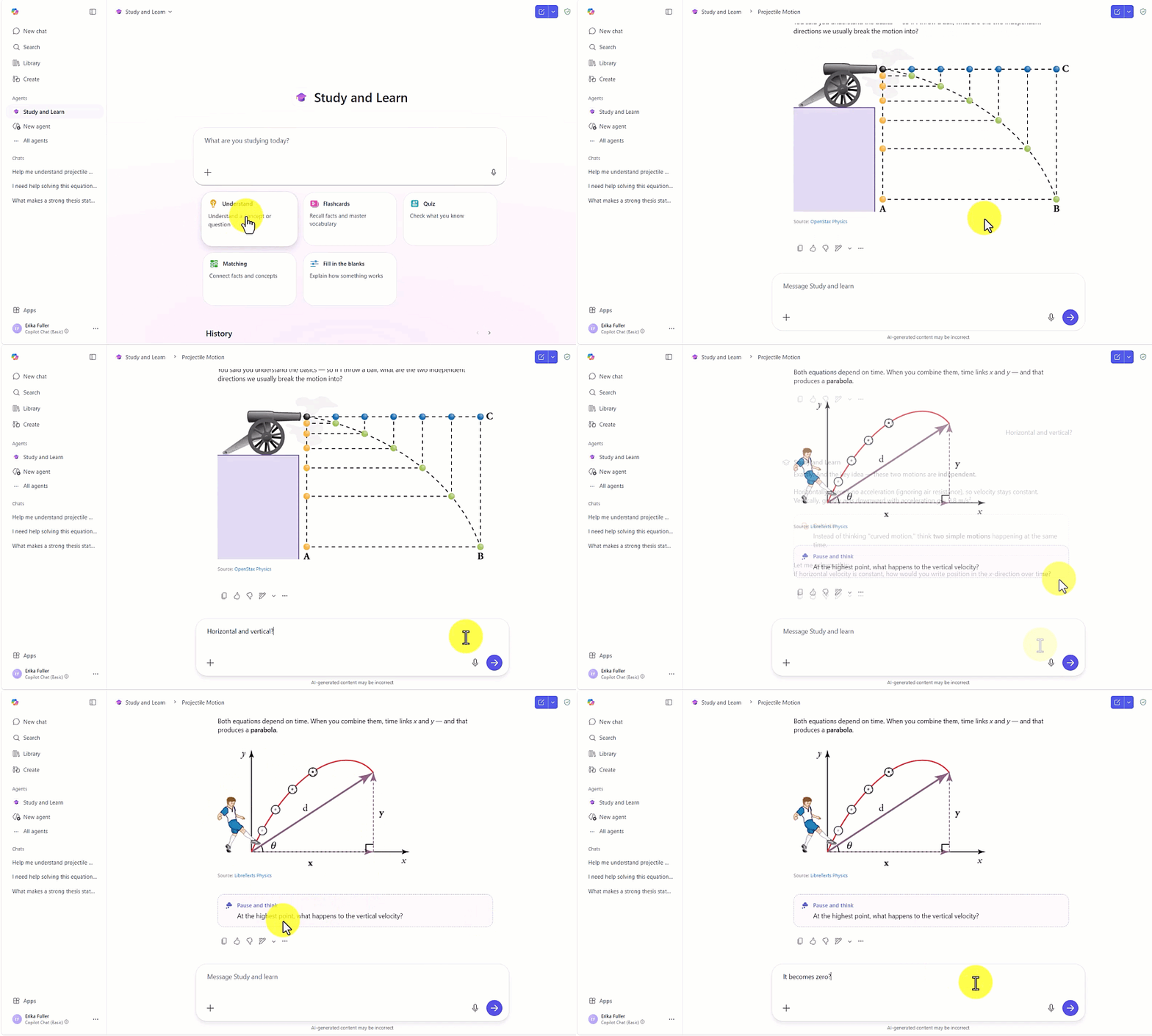
Through guided, conversational interactions and dynamic multimedia activities, the Study and Learn Agent adapts in real time to individual student needs. If a student struggles with a complex calculus equation, the agent resists the temptation to provide the final numerical solution. Instead, it breaks the problem down into manageable components, asking probing questions that guide the student toward discovering the answer independently. For history students drafting argumentative essays, the platform reviews the student’s thesis and poses critical counter-arguments designed to strengthen analytical reasoning.
This pedagogical shift addresses the fundamental barrier of institutional trust. For years, school boards and university committees have hesitated to deploy artificial intelligence due to data privacy concerns, the potential for hallucinations, and the risk of fostering dependency. By embedding the agent within the familiar, secure ecosystem of Microsoft 365 Education—complete with enterprise-grade data protection and compliance standards—Microsoft aims to alleviate these administrative anxieties.
Chronology of Generational AI Integration in Education
To understand the significance of the Study and Learn Agent, it is necessary to examine the rapid evolution of artificial intelligence in academic settings over recent years.

In late 2022, the public release of advanced generative large language models triggered an immediate crisis in global education. Schools and universities scrambled to understand the implications of instantaneous essay generation and automated problem-solving. Throughout 2023, the initial institutional response was overwhelmingly defensive. Numerous major school districts, including New York City Public Schools and Los Angeles Unified, initially blocked access to popular AI tools on school networks, citing fears regarding plagiarism, data harvesting, and the degradation of critical thinking skills.
By 2024, however, educational technology analysts recognized that outright prohibition was an untenable long-term strategy. Students continued to access consumer AI applications on personal devices outside of school hours, creating a digital divide between tech-empowered students and restricted institutions. Forward-thinking districts began experimenting with controlled, policy-driven AI integration, searching for tools that could safely augment instruction rather than subvert it.
Throughout 2025, technology providers responded to this demand by developing specialized educational frameworks. Software companies began emphasizing data privacy, age-appropriate content filtering, and pedagogical alignment. The culmination of this industry-wide pivot arrived in mid-2026 with Microsoft’s introduction of learning-science-backed agents. By integrating these capabilities directly into managed enterprise environments, technology companies provided IT administrators with the granular controls necessary to reopen AI access safely.
Grounded in Learning Science and Cognitive Principles
What separates the Study and Learn Agent from conventional chatbots is its adherence to four foundational, research-backed principles of cognitive science: active recall, scaffolding, spaced repetition, and metacognitive reflection.
Active recall is stimulated through dynamic self-testing mechanisms. Rather than passively reading a textbook chapter on cellular biology, a student can prompt the agent to instantly generate customized flashcard sets or matching activities based on the current curriculum. The system evaluates the student’s responses, identifies knowledge gaps, and dynamically adjusts future study prompts to reinforce weak areas.
Scaffolding is deployed when students tackle multifaceted problems across subjects such as physics, chemistry, or advanced mathematics. Instead of delivering a monolithic solution, the agent acts as a virtual Socratic tutor. It provides conceptual hints, illustrates principles with integrated visual aids and diagrams, and guides the learner step-by-step through the problem-solving methodology.
Spaced repetition and metacognitive reflection are woven into the fabric of the ongoing dialogue. The agent tracks conceptual progression over time, encouraging students to evaluate their own understanding through targeted follow-up inquiries. By prompting learners to explain why a particular methodology works, the platform fosters deeper neurological retention that extends far beyond the immediate demands of a standardized test.
Administrative Controls and Implementation Architecture

For school principals, district superintendents, and IT administrators, the deployment of student-facing artificial intelligence requires stringent oversight and uncompromised data security. Microsoft has structured the deployment of the Study and Learn Agent to respect institutional hierarchies and privacy mandates.
For K-12 accounts, Copilot Chat—and by extension the Study and Learn Agent—is disabled by default for students. Access must be explicitly enabled by an authorized IT administrator via the administrative console. Once permission is granted, students aged 13 and older access the agent directly within the unified Microsoft 365 Copilot application using their institutional Microsoft Entra ID school credentials. No separate software installation, third-party registration, or additional login is required, minimizing friction for both students and technical support staff.
The platform operates entirely within Microsoft’s enterprise privacy boundaries. Student prompts and institutional data are not utilized to train public foundational models, satisfying stringent compliance requirements such as the Family Educational Rights and Privacy Act (FERPA) and the Children’s Online Privacy Protection Act (COPPA). Comprehensive configuration video walkthroughs and administrative guides have been made available via Microsoft’s deployment portal to assist schools in establishing proper governance policies before rollout.
A Comprehensive AI Ecosystem for Education
The release of the Study and Learn Agent is a critical component of Microsoft’s broader, long-term vision for an education-specific artificial intelligence ecosystem. Rather than offering a single, one-size-fits-all utility, Microsoft has architected complementary AI agents tailored to the distinct roles within a school community.
This dual-agent framework encompasses:
- Microsoft Copilot with Teach: Designed specifically for educators, this agent assists with lesson planning, differentiated instruction, administrative organization, and resource creation, saving teachers valuable time so they can focus on direct student engagement.
- The Study and Learn Agent: Designed specifically for students, this agent provides individualized, scaffolded academic coaching, interactive study activities, and writing assistance that prioritizes conceptual understanding over automated answers.
Together, these tools create a synchronized digital environment where educators and students operate within a shared, secure technological paradigm.
Broader Implications and Industry Impact
The introduction of the Study and Learn Agent reflects a broader maturation of the educational technology sector. As generative AI shifts from an experimental novelty to core infrastructure, the metric of success is no longer computational speed, but rather cognitive enrichment.
Industry analysts observe that by embedding active learning methodologies directly into enterprise productivity suites, technology providers are compelling software developers to respect pedagogical standards. If successful, tools like the Study and Learn Agent could neutralize the ethical dilemmas surrounding AI in academics, transforming a perceived threat to intellectual integrity into a powerful equalizer for personalized, student-centric tutoring.
Getting Started and Availability
The Study and Learn Agent is currently available globally within the web and desktop versions of the Microsoft 365 Copilot application for all educational institutions maintaining qualifying Microsoft 365 Education licenses, at no incremental cost.
At launch, the agent is fully optimized for English-language curricula in the United States, with a planned expansion to additional languages and regional educational frameworks rolling out in the coming weeks.
IT administrators wishing to deploy the tool for students aged 13 and older must complete the following deployment steps:
- Review organizational AI policies and governance frameworks with school leadership.
- Access the Microsoft 365 administrative center to enable Copilot Chat for eligible student accounts.
- Utilize Microsoft’s configuration video walkthroughs and support documentation to ensure proper policy enforcement.
- Communicate acceptable use guidelines and privacy safeguards to faculty, parents, and students.
Through these measures, educational institutions now possess a viable, research-backed pathway to embrace the future of artificial intelligence while safeguarding the essential work of student-led learning.